
Most people who ask for Arc on an iPad are asking for its sidebar. The tabs are in a list down the side, the sites you open every day are pinned above them, and work and home each get a Space of their own.
Arc is built for the Mac and Windows, though, and an iPad is used differently: its windows change size, a finger, a trackpad and a keyboard take turns, and there is usually an iPhone in the same bag.
This page puts Arc, Arc Search and Safari next to Tweed. For each one I describe what it does well, where it stops, and when it works better beside another tool than on its own. I checked the facts against public sources in October 2026, and they are listed at the end.
At a Glance
Arc is the browser people mean when they ask for an alternative. The other two are what you can use on an iPad today, next to Tweed.
| Feature | Arc | Arc Search | Safari | Tweed |
|---|---|---|---|---|
| Runs on | Mac, Windows | iPhone, iPad | iPhone, iPad, Mac | iPhone, iPad |
| Made for | A computer’s wide window | Searching on a phone | Everyday browsing on every Apple device | An iPad’s windows, and a sidebar of tabs |
| Price | Free | Free | Free, built in | Free in the public beta |
What Tweed Is For
Tweed is a browser for iPad and iPhone built around a sidebar. Pins sit at the top, your open tabs are listed below them in the order you left them, and groups fold a trip’s worth of tabs into one row. Each Space is a sidebar of its own, and you change Space by swiping across it.
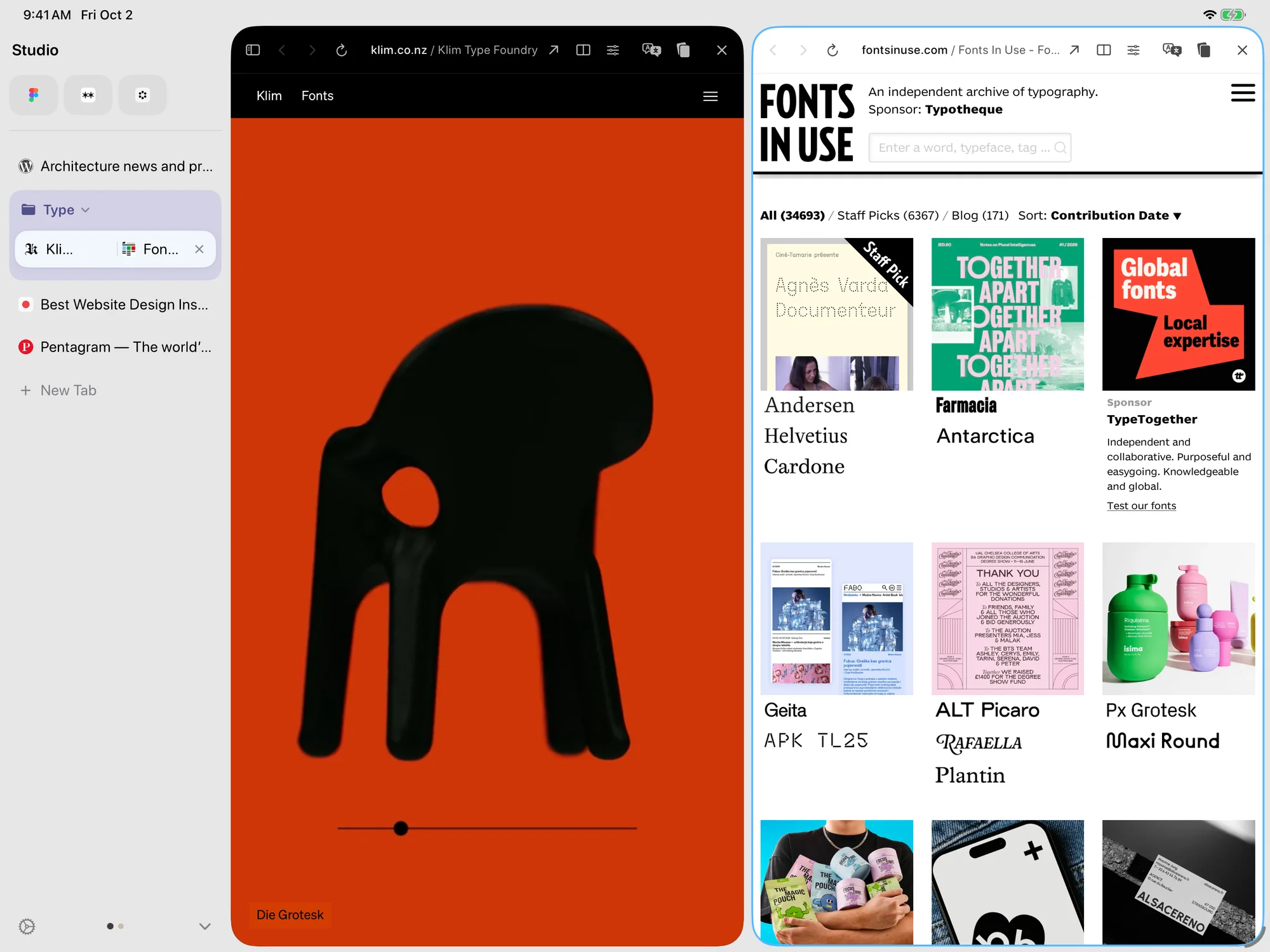
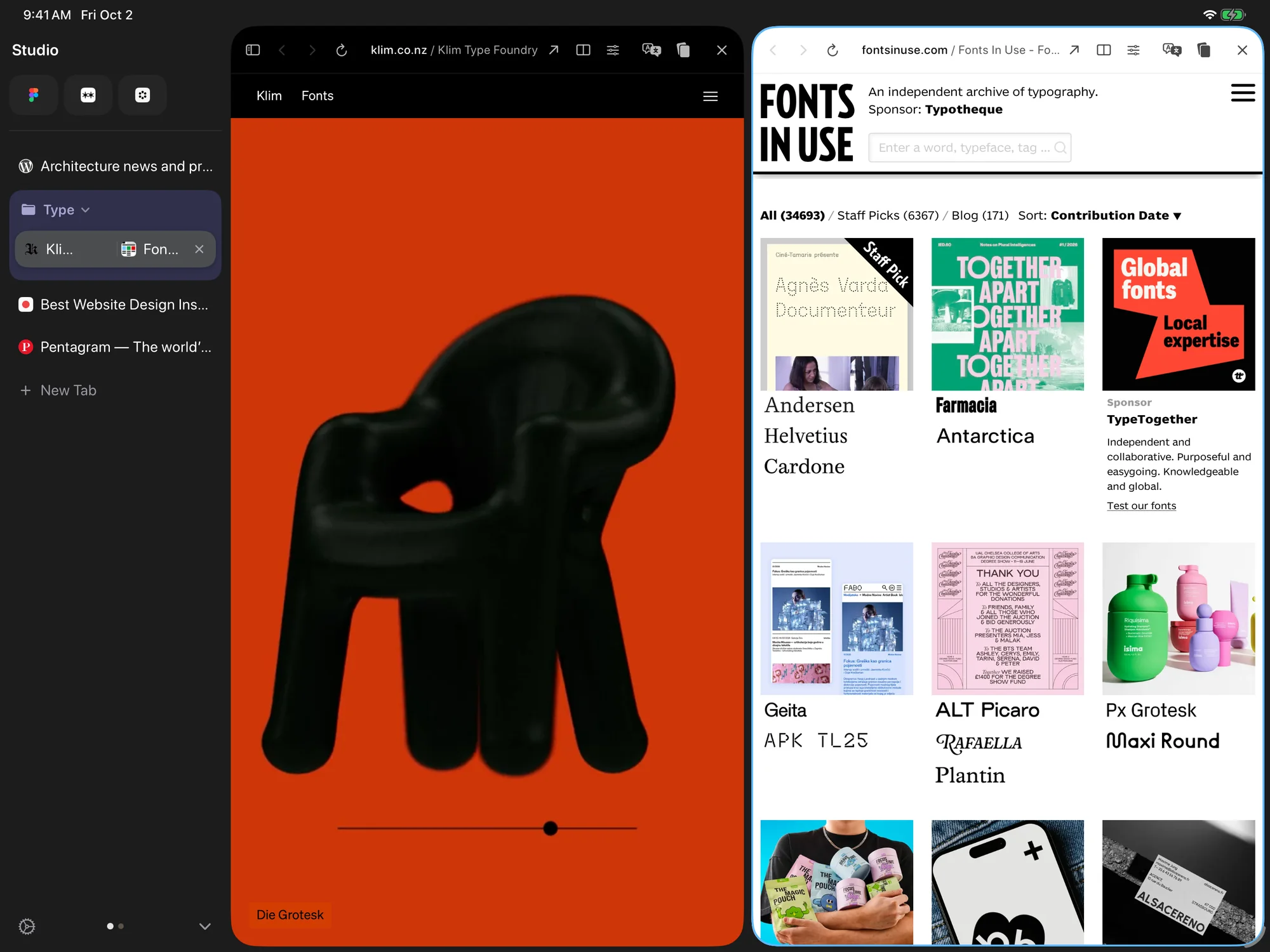 1Pins2Tabs3Group4Split View5Spaces
It uses WebKit, the engine Safari uses, so pages look the way you expect. Tabs, pins, groups, bookmarks, history and Spaces sync through your own iCloud, so there is no Tweed account. At full screen on an iPad the sidebar and the page sit side by side, the sidebar can be hidden when the window shares the screen, and a narrow window switches to the iPhone layout.
That is also the edge of what it does. Tweed is made for iPhone and iPad, it is a public beta on TestFlight, and it needs iPadOS 26 or iOS 26 or later.
- Runs on
- iPad, iPhone
- Price
- Free in the public beta
Where Tweed Is the Better Choice
Tweed isn’t the best tool on this page for everything. In three cases I think it is, and these are the reasons.
You want Arc’s sidebar on an iPad.
Arc runs on Mac and Windows, and Arc Search was designed for the phone. Tweed is the one here whose main screen is a sidebar of pins, groups and Spaces, made for an iPad’s windows, touch, trackpad and keyboard.
Your window keeps changing size.
On an iPad the same window is full screen in the morning, beside another app at noon, and a narrow column during a call. Tweed lays the sidebar out for each of the three, and the narrow one is the iPhone layout with every pin, group and Space still there.
The same tabs have to be on your phone.
Tabs, pins, groups and Spaces sync through your own iCloud, so what you opened on the iPad is in the tab list on the iPhone. There is no account to create.
Outside these cases, another tool on this page is often the better one. Each section below says where that’s true, and what Tweed does better in return.
On the Computer
Arc is the one tool here that was never made for an iPad. It is a desktop browser, and I’ve included it because it’s what the search is about.
Desktop browser
Arc
Arc is a browser for Mac and Windows from The Browser Company, and it’s very good at being one. Open tabs are listed in a sidebar, favorite and pinned sites sit above them, and Spaces keep different parts of your life apart. It also has Split View, and it is built on Chromium.
Where it stops is the iPad. There is no iPad version of the Arc browser. In May 2025 The Browser Company announced that it had stopped developing new features for Arc in order to focus on a new browser, Dia, and that Arc would keep getting bug and security fixes.
Arc Compared With Tweed
Arc and Tweed organize tabs in much the same way: a sidebar, pinned sites and separate Spaces. The difference is the device each one is made for. Arc is made for a computer, and Tweed is made for an iPad and an iPhone.
On a computer, Arc goes further. It has features Tweed leaves out on purpose, such as Boosts and Easels, and it runs on Windows. On an iPad, Tweed is the one designed for the windows, the touch and the keyboard.
If your tabs are on a Mac or a PC, Arc still works, though it now receives only fixes. If you want the same idea on an iPad, Tweed is the better choice.
Choose Arc when
You browse on a Mac or Windows, and you like Boosts, Easels and the rest of what Arc adds.
Choose Tweed when
You browse on an iPad or iPhone, and you want a sidebar of pins, groups and Spaces made for them.
With Tweed Many people will keep Arc on the computer and use Tweed on the iPad. In Tweed’s Settings, Import and Export brings in bookmarks, a reading list and history from Safari or from another browser’s export file. Spaces aren’t imported, and each new Space starts empty.
- Runs on
- Mac, Windows
- Price
- Free
- Official site
- arc.net ↗
On the iPhone and iPad
These two are already on your iPad, or one tap from it. Each does something Tweed doesn’t, and each is worth knowing before you choose.
Phone browser
Arc Search
Arc Search is a separate app from The Browser Company, and it runs on iPhone and, since June 2024, on iPad. It was designed for the phone: searching comes first, a Browse for Me feature gathers the results into a page, and it blocks ads and trackers. It is a free download.
Where it stops is the sidebar. It isn’t the Mac browser on a bigger screen. When the iPad version arrived it was described as a layout streamlined for the larger screen, with a design made for tablets to come later.
Arc Search Compared With Tweed
The two start from different questions. Arc Search starts from searching: you ask, and it assembles an answer. Tweed starts from the tabs you already have open and how they are arranged.
If you mostly look things up on a phone, Arc Search is the better choice, and Tweed doesn’t compete with its search features. If you keep many tabs open and want them in pins, groups and Spaces, Tweed is the better choice.
Choose Arc Search when
You mostly look for answers on a phone, and you want them quickly.
Choose Tweed when
You keep many tabs open on an iPad, and you want them arranged.
With Tweed The two fit together: Arc Search for a quick question, Tweed for the tabs you want to keep.
- Runs on
- iPhone, iPad
- Price
- Free
- Official site
- App Store ↗
Built in
Safari
Safari is built into every iPad and iPhone, and it’s very good at being the default. It uses WebKit, syncs your tabs through iCloud, and has Tab Groups, a Reading List and support for extensions.
Where it stops is the layout. Safari keeps open tabs in a strip along the top of the window, and with twenty of them each one is an icon and a few letters. It has a sidebar too, for Tab Groups, bookmarks and the Reading List.
Safari Compared With Tweed
Safari and Tweed draw pages with the same engine, so a website looks the same in both. The difference is the layout around the page: Safari’s tabs sit in a strip, and Tweed’s sit in a sidebar with pins, groups and Spaces.
If you keep a handful of tabs open, the browser that came with the iPad is enough, and Safari is the better choice. If you keep twenty or thirty open and often use the browser beside another app, Tweed is the better choice.
Choose Safari when
You keep a handful of tabs open, and the browser that came with the iPad is enough.
Choose Tweed when
You often have twenty or more tabs open, and you use the browser beside other apps.
With Tweed You don’t have to leave Safari behind. Tweed imports Safari’s bookmarks, reading list and history, and it can be your default browser, so links from other apps open in it.
- Runs on
- iPhone, iPad, Mac
- Price
- Free, built in
- Official site
- apple.com/safari ↗
Where Tweed Falls Short
These are the things Tweed doesn’t do, or does less well.
- Tweed is made for iPhone and iPad. There is no Windows or Android version.
- It is a public beta on TestFlight, so it still changes from build to build. Each TestFlight build expires after 90 days, and Apple limits the number of testers.
- It needs iPadOS 26 or iOS 26 or later.
- It doesn’t copy everything in Arc. There are no Boosts or Easels.
- It uses WebKit, so Chrome extensions don’t run in it.
- It doesn’t gather search results into a page the way Arc Search does.
Where Your Tabs Are
Every tool on this page is good at something. If your tabs are on a Mac or a PC, Arc is still there, and Safari is already on your iPad. If you keep a lot of tabs on an iPad and want them in a sidebar, that is the part Tweed is for.